Tampilkan postingan dengan label galaxy. Tampilkan semua postingan

Sabtu, 28 Februari 2015

The Android 2.3.5 Gingerbread just recently hits on Samsung Galaxy Ace S5830 users over Netherlands. The firmware build number is S5830XWKS2, this has a XEN CSC file for Dutch- S5830XENKS1 and a build date of September 17, 2011. This is the first Android 2.3.5 Gingerbread build that has been released for Samsung Galaxy Ace and slowly being pushed worldwide. Some improvements and new features of Android 2.3.5 were added on this version such as flashing of touch buttons, overscroll glow effect, more convenient and faster than the previous releases and any other bug fixes and issues were too early to tell.

Firmware info:
Model: Samsung Galaxy S5830
Build number: S5830XWKS2
CSC: S5830XENKS1
Version: Android 2.3.5 Gingerbread
Build date:  September 17, 2011

Languages available
- Čeština
- Dansk
- Deutsch (Deutschland)
- Deutsch (Österreich)
- Deutsch (Schweiz)
- English (Australia)
- English (Ireland)
- English (New Zeland)
- English (Sout Africa)
- English (United Kingdom)
- English (United States)
- Español (España)
- Español (Estados Unidos)
- Français (France)
- Hrvatski
- Icelandic
- Irish
- Italiano
- Kazakh
- Latviešu
- Lietuvių
- Macedonian
- Magyar
- Nederlands (België)
- Norwegian
- Polski
- Português
- Română
- Slovenčina
- Slovenščina
- Suomi
- Svrnska
- Türkçe
- Ελληνικά
- Български
- Русский
- српски
- YKPAÏHCBK
- 한국어
 Note: may contain inaccuracy

build info:
ro.build.user=root                                                                      
ro.build.host=DELL133
ro.build.tags=release-keys
ro.product.brand=samsung
ro.product.model=GT-S5830
ro.product.name=GT-S5830
ro.product.device=GT-S5830
ro.product.board=GT-S5830
# ro.build.product is obsolete; use ro.product.device
ro.build.product=GT-S5830
ro.product.cpu.abi=armeabi
ro.product.manufacturer=samsung
ro.product.locale.language=en
ro.product.locale.region=GB
ro.wifi.channels=
ro.board.platform=msm7k
# Do not try to parse ro.build.description or .fingerprint
ro.build.description=GT-S5830-user 2.3.5 GINGERBREAD XWKS2 release-keys
ro.build.fingerprint=samsung/GT-S5830/GT-S5830:2.3.5/GINGERBREAD/XWKS2:user/release-keys
# Samsung Specific Properties
ro.build.PDA=S5830XWKS2
ro.build.hidden_ver=S5830XWKS2
ro.build.changelist=584844
ro.build.buildtag=
# end build properties


Download: S5830XWKS2 stock ROM 
S5830_XEN_S5830XWKS2_S5830XENKS1_S5830XWKS2 via sammobile.com link
pass: samfirmware.com

S5830_XEN_S5830XWKS2_S5830XENKS1_S5830XWKS2 via sampro link
pass: sampro.pl
Read More..
Heres simple tricks on how you can set a ringtone to a contact on Samsung Galaxy Ace S5830. You can assign an specific ringtone of your choice to your chosen contact that have been save in your Galaxy Ace phone book.

Ive do this settings in order for me to quickly know whos calling me out from the specific ringtone Ive assigned to it. You can apply it too by simply following the steps below. You can select and assigned each as you want.

Heres how to set and assigns a notification ringtone on Samsung Galaxy Ace:

> On the Main Home Screen Press the contacts icon.
> select your desired contact where you to set and assign a desired ringtone.
> Tap and hold the required contact until a pop-up menu is displayed.
> Tap Edit.
> Tap Ringtone.
> Tap Default ringtone, Sound or Phone ringtone.
> Tap OK.
> Tap Save.
> Then tap the Home key to return to standby mode.

Then try to call that specific contact or number on your Samsung Galaxy Ace S5830 using another phone and see it works.
Read More..
Just another fresh report, a Samsung Galaxy S 4G update firmware leaked. Not sure where Krylon is grabbing them from, but Id guess hes got a URL that Kies might use to check for updates and grab files.
This is an Odin stock ROM, NOT deodexed,ODEXED, No root, No custom kernel. A plain samsung leak with no modifications.

From Krylons thread:
http://rootzwiki.com/showthread.php?t=2972

ro.build.display.id=GINGERBREAD.VUVKH2
ro.build.date=Thu Aug 11 23:26:34 KST 2011

Here we go again.
Found another leak for the SGS4G. This one has a build date of 08/11.

Im sure this fixes some issues that were found in KH1.

Same steps, Extract then ODIN to flash.

Im sure a Deodexed version will come soon.
Thanks to my partner in crime Chainfire

Download

FBis251   from XDA-developer just recently run a test by this firmware.
Just did some testing. Wifi signal full, incoming calls dont get dropped, all show up on call logs, no force closes. I havent tried restoring apps or data, and havent tried the deodexer yet but this is going REALLY well.
Read More..

Jumat, 27 Februari 2015

The South Korean company not for a single second and is constantly evolving , which is important in the world of technology if not lag behind . One of the things that characterizes Samsung is the large number and variety of mobile devices that has to its credit , smartphones and tablets with covering different ranges , from low , to mid-range to high-end devices .

Over the past few days has heard of the Samsung Galaxy Note 3 Lite , but this is not the only device that is working on a new tablet , which would be called Samsung Galaxy Tab 4 . Today has appeared a mysterious model on a website called Zauba India that makes us think it might be this new tablet.


The model in question is the SM- T331 and based on it we can come to the conclusion that you can try a new model that belong to the series of the Galaxy Tab , and remember that the Galaxy Tab 8.0 features three model numbers SM- T310 SM - T311 and SM- T315 . Moreover, beside the SM- T331 model has also been leaked that would price the device, which would be $ 550, which suggests a high-end tablet , or at least a higher range than the current Galaxy Tab.

The fact that the SM- T331 may correspond to the Samsung Galaxy Tab 4 and it can be a higher current to the Galaxy Tab range market model begs the possibility that the new tablet from the South Korean company is accompanied by a screen Super AMOLED .

Currently we do not have much information about the Samsung Galaxy Tab 4, even the screen size remains a mystery , but some believe it could be between 8 and 10 inches , since apparently Samsung would be working in panels Super AMOLED those sizes . Regarding the other specs from SamMobile say that we should not expect that has powerful features like those found in the Samsung Galaxy Note 10.1 in 2014, but is expected to have a good value for money.

However, we have to wait to see if new leaks truly mysterious SM- T331 model corresponds to the Samsung Galaxy Tab 4 and gradually also know the possible features that would have the new Samsung tablet arise.
Read More..
Two stock ROMs for Samsung Galaxy Ace S5830 Android phones are now available on samfirmware.com, the S5830XWKPO and S5830BOKP5. Both version are Android 2.3.3 Gingerbread with build date of July 2011. We arent get any detailed info of which and what specific regions these firmwares allegedly came from, so we check it out over samfirmware SAMFIT tool and heres what information we got.

S5830XWKPO - A Europe version with CSC file LUXKP1 for Rogers- Canada but this one is confirmed for Luxemburg.
Samsung Galaxy Ace S5830 S5830XWKPO 2.3.3

Samsung Galaxy Ace S5830 S5830XWKPO 2.3.3 gingerbread
S5830BOKP5 - A Europe version with CSC file TNL for T-Mobile - Germany. 
Samsung Galaxy Ace S5830 S5830BOKP5 2.3.3 gingerbread
These two ROMs are now available online just grab it over samfirmware.com download area.
Read More..

Kamis, 26 Februari 2015


The Samsung Galaxy S III is probably the most sought after Android device to have come out ever, but with such a huge demand comes the higher chance of one in millions buying the phone accidentally dropping it and cracking the screen. We’d feel a chill if we did - the device costs around $750 off contract after all.

But if you crack the screen, or just want to peek inside the Galaxy S III to see what makes it tick, now there’s a video walkthrough of how you can disassemble the gadget. Weve already seen the step by step instructions to opening the S III, but while those were only pictures, now you have a full video so you can pause, rewind back and forward, and generally feel safer prying your device open. Interestingly, the first teardown showed that the new Samsung flagship features the very same camera as the one on the iPhone 4S.


This here video is around 20 minutes long, so you definitely have all the details you want. Take a look below.


Read More..
Heres what you are looking for the Galaxy Gio S5660 User Manual you can download it here. It was not yet long time ago since the Samsung Galaxy Ace S5830 has been released and you will need to know how to navigate of its function.

Well, heres the Samsung Galaxy Gio S5660 User Manual
Samsung Galaxy Gio GT-S5660 mobile phone user manual is now available online and can be downloaded directly at Samsung website. This Samsung Galaxy Gio GT-S5660 manual comes in 130 pages on PDF document format (2.66 MB).

Samsung Galaxy Gio GT-S5660 User Manual PDF

Download here.

All you need to know about how to use you Samsung Galaxy Gio S5660 is on it.
Read More..

Rabu, 25 Februari 2015

Review Price and Specs Samsung Galaxy Mini GT-S5570

"samsung galaxy mini specs"

Samsung introduced mini series Galaxy, known by GT-S5570 series, very similar with Galaxy 5 series. Its dimension a bit larger than Galaxy 5, there also for feature and technology, this ‘Galaxy Mini’ one level higher than Galaxy 5, one of them is Android Foyo 2.2 operational system using. Although so, the resolution is still the same, that is 240 x 320 pixels, the look would be comfortable enough.

Its physical dimension fit in adult’s palm. Its jagged edge motive in rear case made it not slippery. While about its material, Samsung Galaxy Mini GT-S5570 choose plastic as cover with 2 colors coated it, they are black and green metallic. There are 3 buttons in face side, they are Option, Home and Back, while in its right and left side, there are volume control, key button and MicroSD hotswap slot, so, the memory could be replaced without turn the phone off.

samsung galaxy mini specs
Beside, in upper part there is slot for audio 3.5mm and microUSB. This cell phone use 3.15 megapixels camera and some of supporting features. When tested to take picture in the room with moderate light and night modus set, the picture clear enough. Its map feature is not only presented map and location where we are, but also other important places like restaurant, café, bar, and hotel. ATM and gas station also provided here. Huge screen became its plus point, compared with its predecessor, Galaxy 5. Its icon looks also simple, not like the other Android which is not attractive much.
Samsung Galaxy Mini GT-S5570

This phone worth to be owed, moreover, its operation system has used Android Froyo 2.2. its battery ability also good, in less than 50% condition, its battery could survive in one day.

samsung galaxy mini specs

Spesification
Network : GSM 850 / 900 / 1800 / 1900 / 2100MHz
Dimension : 110.4 x 60.6 x 12.1 mm
Weight : 107 gram
Screen : 3.14 inches (480 x 320 pixels)
Camera : 3.15 Megapixels (2048 x 1536 pixels)
Connectivity : GPRS, EDGE, 3G, Bluetooth v2.1 with A2DP, MicroUSB
Memory : 160 MbB, MicroSD (hotswap) 32 Gb
Battery : Li-ion 1200 mAh
Other features : Android 2.2 (Froyo), 600 MHz processor, Music player, Video player, Radio FM, Voice recorder,
Social hub, Push email, Google search, Gtalk, Gmail, YouTube and Quick office, Accelerometer censor, Compass, Alarm, Calendar, Doucument viewer, Calculator
Price : $205 (2011 March)
update: samsung galaxy mini price januari 2012 $120
samsung galaxy mini specs
Read More..
Upgrade Galaxy Mini gingerbread 2.3.6 Indonesia
artikel ini merupakan lanjutan dari artikel sebelumnya, silakan buka dulu artikel sebelumnya >> Persiapan Upgrade Galaxy Mini gingerbread 2.3.6 Indonesia 

kali ini merupakan tahapan install gingerbread 2.3.6 bahasa indonesia untuk samsung galaxy mini
(S5570DXKT6_S5570OLBKT3_S5570DXKT4_HOME.tar)

persiapan
ekstrak semua file yang telah anda download pada artikel sebelumnya pada satu folder.
pastikan batre hp samsung galaxy mini anda  full
jika menggunakan laptop usahakan batre dalam keadaan ful
jika semuanya siap ikuti langkah brikut

1. tahap pertama masuk ke download mode
caranya : Matikan Samsung Galaxy Mini anda dan masuk download mode dengan menekan & menahan tombol Volume Down, Home Button, dan Power Button secara bersamaan. [lihat gambar dibawah]


nanti akan muncul adalah seperti gambar dibawah ini


download mode

2. tahapan upgrade

--- buka program flasher (odin Multi Downloader)
buka multi odin di laptop/PC kemudian colokkan HH ke laptop/PC [jika driver sudah terinstal dengan baik, maka akan dpt dipastikan galaxy mini anda terdetek seperti gambar dibawah ini]


-- Klik tombol OPS dan cari file TASS_v1.0.ops lalu Open. [lihat gambar dibawah]


-- Centang One Package (1) dan klik tombol One Package (2) , cari file firmware nya, pada saat saya posting ini, saya menggunakan firmware  S5570DXKT6_S5570OLBKT3_S5570DXKT4_HOME.tar.md5 lalu Open


-- klik Star dan tahapan install / upgrade sedang dimulai [lihat gambar dibawah]


-- Tunggu sampai selesai biasanya sekita 4-6 menit sampai muncul tulisan PASS [lihat gambar dibawah]


jika telah selesai Close aplikasi Odin Multi Downloader dengan klik tombol silang (x) di pojok kanan atas.

Lepaskan smartphone Galaxy Mini dari komputer.

selamat Samsung Galaxi Mini Anda telah di Upgrade gingerbread 2.3.6 Indonesia

tags : aplikasi android samsung galaxy, game, app, apps, support android phone: hp, ponsel, seluler, cell, samsung galaxy, young, ace, mini, s 2,sony mobile, nokia, sony ericsson xperia, x10, x8, motorola, LG, HTC, droid, nexus, s, nexian, zte, htc and all android phone
Read More..

Selasa, 24 Februari 2015

This is a step by step guide on how to manually upgrade or update the Samsung Galaxy S SL I9003 to the latest Android 2.3.4 Gingerbread Arabic firmware version released with build number I9003JPKP5. This ROM  has been reportedly an official released fro Arabic region users of  Galaxy SL I9003. This firmware were already been tested and works with better performance to the device.

Disclaimer: We are not responsible if you may bricked your phone by following this procedure, proceed at your own risk and take extra precautions. Remember this is a stock ROM, flashing this unto your Samsung galaxy S SL GT-I9003 needs extra precaution or you might end up bricking your phone, if you are not familiar in flashing by way of using Odin tool, do not attempt to try it unless you already done careful research and knows exactly what to do.

 Firmware details:
Build number: I9003JPKP5 - default Arabic language
Version: android 2.3.4 Gingerbread
BOOTLOADER: APBOOT_I9003JPKP5_CL482273_REV08_user_low_ship.tar .tar
PDA: CODE_I9003JPKP5_CL482273_REV08_user_low_ship.tar.t ar
CSC: I9003OJPKP6_CL491426_CSC.tar.tar
PHONE: MODEM_I9003JXKP3_REV_00_CL1040711.tar.tar

Download the following firmware files:

Samsund Galaxy S SL Arabic Firmware I9003JPKP5 Android 2.3.4 Gingerbread.
via samfirmware.com link.password is  samfirmware.com

PIT File: latona_20110114
ODIN: Odin3 v1.82.exe


ODIN Flashing Procedure to Upgrade Samsung Galaxy S SL I9003 to Android 2.3.4 Gingerbread I9003JPKP5 Firmware.

Important: Do have a back up copy of all your important data stored from your Galaxy S SL before proceeding. Just use any back-up application you may have, for it will be all wipe out after this process.
Ensure that the battery is well charge, much better if its full.
Use a good working PC and a cable wire to avoid any interruption issues.


1. Download and extract the XXKP9 2.3.4 Gingerbread
2. Run ODIN3 v1.83.exe
3. Click PIT button then select and load the file: latona_20110114.pit
     Ensure that the Re-partition, Auto Reboot and F-Reset Time are checked.
3) Turn off your device or remove the battery for a seconds and put it back again, then you need to hold down the Volume Down button + the Home key button (the middle button) and then pressing the Power button. You will then see a downloading display like the image below.

Samsung galaxy S ODIN flashing 04 
Then connect the phone to PC. The ID:COM box will show you an indication if the device is already connected or detected on the PC.

5. Hit the "START" Button to begin flashing the PIT file.

ODIN flashing samsung galaxy S I9003 2.3.4 Gingerbread xxkp9
6. Once finish flashing the PIT file, on ODIN click the "RESET" button. (Re-Partition checkbox will automatically uncheck.)
7. Now load all the needed binary files on ODIN.

Click BOOTLOADER button and select this file: APBOOT_I9003JPKP5_CL482273_REV08_user_low_ship.tar

Click PDA button and select this file:
CODE_I9003JPKP5_CL482273_REV08_user_low_ship.tar

Click PHONE button and select this file:
MODEM_I9003JXKP3_REV_00_CL1040711.tar.tar

Click CSC button and select this file:
GT-I9003-CSC-I9003OJPKP6_CL491426_CSC.tar

Turn OFF the Samsung Galaxy I9003 or remove the battery and reinsert it back again. Then boot the phone into Download Mode again. (Volume Down+Home+Power button).
Hit "START" button to flash the Bootloader, PDA, Phone and CSC files.
Do not touch anything until it finishes, you will then see a word "PASS" on ODIN window when it successfully completes.

Once the flashing finishes remove your device Galaxy S SL I9003 from PC.You may then confirm and check your newly installed firmware through your About Phone Settings. Do a factory  reset to clear cache and have a newly fresh firmware update.
Dont hesitate to send us feedbacks or any further questions on our comment form below.
Read More..
The Samsung Galaxy S2 with carrier branded by Orange gets the official Android 2.3.5 Gingerbread firmware updates. The firmware build number is I9100BVKJ4 with a build date of October 24, 2011.
Many Orange SGS2 owners expected a signal boosts on the Android 2.3.5 firmware, so hope that this will improved signal performance.
I9100BVKJ4 Orange Samsung Galaxy S2 Android 2.3.5 Firmware

Heres a list of  I9100BVKJ4 firmware for each specific region, for advance users who prepared a stock ROM and or having difficulty updating through Kies server. Just take note that the CSC file is different from each other regions.

Austria (Orange)
Product code: GT-I9100LKAONE

CSC: ONE - I9100ONEKJ5

France (Orange)
Product code: GT-I9100LKAFTM
CSC: FTM - I9100FTMKJ5

Poland (Orange)
Product code: GT-I9100LKAIDE
CSC: IDE - I9100IDEKJ4 

Romania (Orange)
Product code: GT-I9100LKAORO
CSC: ORO - I9100OROKJ4

Spain  (Orange)
Product code: GT-I9100LKAAMN
CSC: AMN - I9100AMNKJ4 

UK (Orange)
Product code: GT-I9100LKAORA
CSC: ORA - I9100ORAKJ4 


Code:
# autogenerated by buildinfo.sh                                                         
ro.build.id=GINGERBREAD
ro.build.display.id=GINGERBREAD.BVKJ4
ro.build.version.incremental=BVKJ4
ro.build.version.sdk=10
ro.build.version.codename=REL
ro.build.version.release=2.3.5
ro.build.date=Mon Oct 24 13:33:22 KST 2011
ro.build.date.utc=1319430802
ro.build.type=user
ro.build.user=root
ro.build.host=DELL135
ro.build.tags=release-keys
ro.product.model=GT-I9100
ro.product.brand=samsung
ro.product.name=GT-I9100
ro.product.device=GT-I9100
ro.product.board=GT-I9100
ro.product.cpu.abi=armeabi-v7a
# Samsung Specific Properties
ro.build.PDA=I9100BVKJ4
ro.build.hidden_ver=I9100BVKJ4
ro.build.changelist=681297
ro.product.cpu.abi2=armeabi
ro.product.manufacturer=samsung
ro.product.locale.language=en
ro.product.locale.region=GB
ro.wifi.channels=
ro.board.platform=s5pc210
# ro.build.product is obsolete; use ro.product.device
ro.build.product=GT-I9100
# Do not try to parse ro.build.description or .fingerprint
ro.build.description=GT-I9100-user 2.3.5 GINGERBREAD BVKJ4 release-keys
ro.build.fingerprint=samsung/GT-I9100/GT-I9100:2.3.5/GINGERBREAD/BVKJ4:user/release-keys
# Samsung Specific Properties
ro.build.PDA=I9100BVKJ4
ro.build.hidden_ver=I9100BVKJ4
ro.build.changelist=681297
ro.tether.denied=false
ro.flash.resolution=1080
# end build properties

Advance users who prepares  installing or flashing the firmware using Odin downloader tool can grab the original stock ROMs at sammobile or at XDA. A Frankenstein  version with Dutch CSC file XEUKH2 has been also posted here at Android-hilfe. So, just enjoy upgrading folks!
Read More..

Senin, 23 Februari 2015


Leaked screenshot of U.S. Cellulars internal system shows the Samsung Galaxy S IIIA leaked screenshot of the internal computer system of U.S. Cellular shows that the regional carrier could be among the mobile operators in the States to offer the Samsung Galaxy S III. Based on a couple of entries in the carriers computer system, the 16GB variant of the device will be made available in either white or blue. None of the U.S. carriers has yet to officially announce the device, easily the most anticipated Android phone of the year with 9 million units pre-ordered overseas. As weve told you, that makes the Samsung Galaxy S III the fastest selling device in history.


This leaked screenshot from U.S. Cellular's internal system shows the Samsung Galaxy S III - Leaked screenshot of U.S. Cellular's internal system shows the Samsung Galaxy S III

It wouldnt be out of character for the Samsung Galaxy S III to be available at U.S. Cellular, considering that its predecessor model, the Samsung Galaxy S II, is currently available from the mobile operator. We would expect the major carriers to get first crack at the phone and speculation is that T-Mobile will be launching the unit on June 20th, so dont expect the device to hit the U.S. Cellular line up for a few weeks after that date. Despite some delays, the Samsung Galaxy S III was officially launched globally on Tuesday

Source
Read More..
 This just a simple tips on how to set a different ringtones on you Samsung Galaxy Gio. If you already downloaded your favorite MP3 songs on your PC and want to transfer it in your Galaxy and customize at as your personal message or alert tones,  all you have to do is connect your Samsung Galaxy Gio to your computer or laptop via USB cable and then select "connection type" and get access to storage memory card.
samsung galaxy gio freeze and hang on logo fix

Heres how to connect Galaxy Gio into Mass Storage Mode Option:

- On Main Home Screen tap Menu > Settings > Application
- Enable USB Debugging
- Return to Home Screen
- Then plug the USB cable into your Galaxy S2
- Pull down status bar
- Press Connect USB Storage button

Alternative way without USB Debugging
- Go to Settings > Wireless & Network
- USB utilities and click the button >
- then plug in USB cable

Once youve establish a connection from you Galaxy Gio to your PC, just browse to your mass storage
then find the folder "Notifications", if its not on there, create a new folder and simply renamed it "Notifications".


>SDCARD/ MEDIA/ AUDIO/ NOTIFICATIONS

Then grab a copy music files you wanted from your computer and paste into that folder "Notifications". Once finishes, disconnect your Galaxy Gio from the computer. Then you can set that music files as your message tone.

- Go to Message/Inbox icon located at the bottom of your Samsung Galaxy Gio screen

- In the Message/Inbox Settings simply choose the file that youve copied as your message ringtone

If you already have a music files stored on your Samsung Galaxy Gio S5660, do this steps below:
- Go to "My Files" then copy that mp3 music file you like to use as your messages ringtone.
( Just tap and hold that music file then you can choose either to copy or move that music file)
- Next, paste that music file in your media folder > SDCARD/ MEDIA/ AUDIO/ NOTIFICATIONS
- Go to Message/Inbox icon located at the bottom of your Samsung Galaxy Ace screen

- In the Message/Inbox Settings simply choose the music file that youve copied as your message ringtone
If you have a problem about the volume loudness, this sometimes happens that your custom ringtone volume is too low compared to the pre-installed ringtone on your Galaxy Gio which as much louder.
You can try using this program, MP3GAIN, to boost up maximized the volume of your mp3s decibels.
http://mp3gain.sourceforge.net/download.php

Or this app from Android Market..Volume+ (Sound Boost)
currently using this app for my boosted up mp3s using MP3GAIN.
But works only on Gingerbread..
https://market.android.com/details?id=com.TEST.android.lvh&feature=search_result
Read More..
 HC 3.1 – OTA (update.zip) – Galaxy Tab 10.1

-build static make_ext4fs from cyanogenmod’s repo.
-use system from 6/10′s nandroid backup (CWM restore method release)
-add system script
-use busybox from the tools pack
-use cyangenmod’s update-script as base

Installation Instructions:
Place the hc-3.1_ota-full_sam_tab_10.1.zip on your internal sdcard (/data/media)
Power down the device and plug in USB.
Enter fastboot by holding vol down and power, then pressing vol down (to the USB icon) then up to select.
fastboot boot recovery-cwm_4.0.0.4-sam-tab-10.1.img (latest is -0616; http://droidbasement.com/db-blog/?p=2032)
or
fastboot boot IO’s stock recovery (or adb reboot recovery on IO, 3.0.1)
Install/Apply the zip while in recovery.
unplug usb and reboot.
Note:
-This may not work for encrypted devices. If you run in to issues, please unencrypt it and try again (you may have to full wipe in this instance).
-This is a complete vanilla system with no su/superuser. If you are wanting these things, then flash the tools pack (latest is 6/16).
-If you encounter any issues from the update, please be advised that you may have to wipe your user data.
-This will not work on the ‘v’ model.
Download it it here: http://droidbasement.com/db-blog/?p=2075 
Read More..

Minggu, 22 Februari 2015


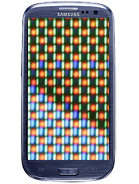
Samsung on why it went PenTile with the Galaxy S III display: Its the longevity, silly!After the Galaxy S III announcement many people, including us, were wondering why Samsung decided to use a PenTile Super AMOLED screen instead of an Super AMOLED Plus unit.

Well, a Samsung spokesman has explained why. The reason turned out to be plain simple – it’s not because Samsung can’t satisfy the demand – it’s just that the PenTile will last longer.

As it turns out, the RGB AMOLEDs degrade much faster than the PenTile AMOLEDs so the picture quality becomes worse faster. The blue pixels are the ones to blame – they degrade faster than the red and green pixels. The PenTile displays have less blue pixels because of the RGBG subpixel layout and that’s why they have longer life span.


Samsung on why it went PenTile with the Galaxy S III display: It's the longevity, silly!

Samsung wants to ensure top-notch display quality even two or three years after the users get their Galaxy S III and it seems the only way is to use PenTile displays.

Does that mean that the Galaxy S II users have only two years of proper service ahead?

We already met the Galaxy S III and thanks to its high ppi density, the PenTile matrix is hardly noticeable (as opposed to the Galaxy S), so you should not worry about the image quality.

Read More..
One very nice feature of the Galaxy S2 (and some other phones in the Galaxy range), is the ability to use it as a portable wifi hotspot! This is fortunately very easy and simple to set up!

Go into your phones settings:


There, tap on "Wireless and network", which brings you to this screen:


Here, tap on "Tethering and portable hotspot", which takes you here:


Now tap on "Portable Wi-Fi hotspot settings":


On this screen you can enable your wifi hotspot, and also configure the security settings and stuff like that for the phone:


Id highly recommend using WPA2 PSK as your security setting, otherwise anyone in range can connect to your phone, and with the ludicrous data rates out there, this can get costly, REAL quick!

Now simply connect with your laptop/tablet/other cellphone to your phones wifi hotspot, enter the password, and you should be good to go! Very handy for if you dont have a 3g dongle or built-in 3g in your laptop. Also if youre in South Africa, free wifi hotspots are a very scarce thing - also, the ones that do exist almost never work!

Enjoy!
Read More..
Heres the latest Samsung Galaxy S I900B Amdroid 2.3.3 Gingerbread update firmware. Biggest thanks to  samfirmware.com for sharing this new Stock ROM version.

The firmware build version is VJVV3 and packed in Android 2.3.3 Gingerbread with a build date of June 03 2011. This firmware can be flash to SAmsung galaxy S 19003 by a way of using ODIN multidownloader
 

Link: http://goo.gl/lsXEw
pass: samfirmware.com
Credits: Jeshter2000
Read More..

Sabtu, 21 Februari 2015


Samsung have announced that eager customers who pre-order the upcoming Galaxy S III flagship from the Samsung Brand Store in Westfield Stratford City, can receive their device a day before its official release date – specifically on May 29th at 6pm.

If youve already pre-ordered your device from another UK retailer, dont fret, as Samsung have also announced that other Samsung retail partners can also make the device available on the 27th, except at 7pm, and at their discretion.

If youre in the Stratford area and are thinking about picking up an S III, why not head over to the official Samsung store and get it a day early?
Read More..
Heres the step by step guide on how to install the latest Android 2.2 froyo firmware update with build number I5500XWJQ3 and a build date of September 15, 2011 on Samsung Galaxy I5500 Europa. I know a lot of you has been awaiting for the Gingerbread version but, this isnt a Gingerbread upgrade for our 5 years old Samsung Galaxy Europa - there are a few customize ROMs and a CyanogenMod7 developed by our trusted developers will do the job.

This firmware has been officially released for Nordic regions in Northern Europe and the North Atlantic which is Denmark, Finland, Iceland, Norway and Sweden. The default CSC file is I5500NEEJP3, stated as NEE - a specific firmware regional code of the Nordic countries from Samsung. But the good thing about this,  is that this can also be flash and install on any Galaxy I5500 over other regions in Europe.

Since this firmware is pulled from the original or official Samsung Kies server released, the I5500XWJQ3 comes in a single file packaged, meaning there are no multiple files such as BOOTLOADER, PDA, PHONE and CSC file, this only contains the HOME.tar.md5 file. So, flashing it is little bit convenient by way of using Odin downloader tool. If youd ask on of what new on this update, well, we doesnt know it yet that much, since it just freshly released. Only a few improvements, enhancements and bug fixes from previous released that comes so far. We will just try to update this post if found a little bit interesting since the fact that this is still an Android 2.2 Froyo. 


Heres how to flash and install the I5500XWJQ3 Android 2.2 Froyo Firmware Update on Samsung Galaxy Europa I5500.

Disclaimer: This procedure is yet simple but there is a risk of bricking your device. We are not liable any problems may happen to your phone, proceed at your own risk.

Download
Stock ROM / Firmware: via SamMobile link
I5500XWJQ3
CSC: I5500NEEJP3
Version: Android 2.2 Froyo
Released: September 15, 2011
password: samfirmware.com

Samsung Galaxy I5500 OPS file:
EUROPA_v1.0.ops


Samsung Galaxy I5500 Odin version:
ODIN Multi Downloader v4.28

- Ensure to back up all of your important data stored on the device. 
- Ensure that you have a back up copy of  your original stock ROM, see list here.
- Use a good working  USB to PC cable for Galaxy I5500.
- Disable Kies or antivirus from your computer, that might interrupt the process.
- Do a factory reset if you previously run from 2.1 or 2.2 firmware.
- Remove the Sim card and memory to avoid any issues.

1) Extract the downloaded firmware files, then you will get the I5500XWJQ3_I5500NEEJP3_I5500XWJP4_HOME.tar.md5 file in a folder.
2) Run Odin v4.28 on your computers desktop.
3) On Odin window, click the OPS button then select and load the EUROPA_v1.0.ops on that field.
4) On the upper left side, tick the One Package checkbox, just let the Auto-Reboot and protect OPS remained unchecked.
5) Now, on the lower part of Odin click the One Packaged button then select and load the I5500XWJQ3_I5500NEEJP3_I5500XWJP4_HOME.tar.md5 file on that slot.  See the image below thats how its gonna be look like.

Install I5500XWJQ3 Firmware Update Android 2.2 Froyo on Samsung Galaxy 5 I5500 Europa
6) Its now time to prepare the Galaxy I5500 into download mode.
    TO boot into download mode - Turn it OFF or remove the battery out for a second then put it back again. Dont power it yet, just press and hold the Volume Down button, Center Button and the Power button simultaneously. You will then see an Android robot digging with a shovel inside a triangle and a word states downloading.

Samsung Galaxy 5 I5500 Europa download mode buttons
7) Once already set in download mode, connect the phone to PC via USB cable wire. Theres a word "ADDED appears and a yellow color will highlight on the COM:PORT mapping if the phone is already detected and or connected.
8) Once the device already ensured on its connection on the PC and Odin recognized it, just hit the "START" button to begin flashing.
Odin flashing I5500XWJQ3 Firmware Update Android 2.2 Froyo on Samsung Galaxy 5 I5500 Europa
9) Just wait until the whole flashing process finishes. Do not touch the phone that might interrupt it, this is the very risky part and will cause bricking the phone if interrupted.  It will only takes around 4 to 5 minutes just only depends on your computers speed.
A word "PASS" will show on Odin once it done, and the device will then just automatically reboot.

After the phone reboots, unplug it from PC. Then do a factory reset to get a fresh firmware upgrade.
Heres a code for factory reset  *2767*3855# and to check and confirm the newly firmware installed is *#*#1234#*#*.
Read More..
The ROM leaks for Samsung Galaxy S2 I9100 has been leaked and released by samfirmware. The said ROM update with a build number of I9100XXKI3 with CSC file I9100OXAKI3 and the build date of September 15 2011. This is the first Android 2.3.5 Gingerbread that leaks for Samsung Galaxy S2, and been reportedly released by samfirmware and darkys team.

Samsung Galaxy S II android 2.3.5 gingerbread update

So, any advance user can now flash the I9100XXKI3 Android 2.3.5 Gingerbread stock ROM and upgrade the Samsung Galaxy S II system firmware by using ODIN downloader tool. We will update this report for any enhancement and improvements, bug fixes etc. regarding this leaked I9100XXKI3 android 2.3.5 update firmware

Firmware Details:
Phone: I9100XXKI3
CSC: I9100OXAKI3
Build version: Android 2.3.5 Gingerbread
Model: Samsung Galaxy S2 I9100
Builddate: 15.09.2011


info:
  1. # begin build properties
  2. # autogenerated by buildinfo.sh
  3. ro.build.id=GINGERBREAD
  4. ro.build.display.id=GINGERBREAD.XXKI3
  5. ro.build.version.incremental=XXKI3
  6. ro.build.version.sdk=10
  7. ro.build.version.codename=REL
  8. ro.build.version.release=2.3.5
  9. ro.build.date=Thu Sep 15 13:53:07 KST 2011
  10. ro.build.date.utc=1316062387
  11. ro.build.type=user
  12. ro.build.user=se.infra
  13. ro.build.host=SEP-55
  14. ro.build.tags=release-keys
  15. ro.product.model=GT-I9100
  16. ro.product.brand=samsung
  17. ro.product.name=GT-I9100
  18. ro.product.device=GT-I9100
  19. ro.product.board=GT-I9100
  20. ro.product.cpu.abi=armeabi-v7a
  21. # Samsung Specific Properties
  22. ro.build.PDA=I9100XXKI3
  23. ro.build.hidden_ver=I9100XXKI3
  24. ro.build.changelist=577579
  25. ro.product.cpu.abi2=armeabi
  26. ro.product.manufacturer=samsung
  27. ro.product.locale.language=en
  28. ro.product.locale.region=GB
  29. ro.wifi.channels=
  30. ro.board.platform=s5pc210
  31. # ro.build.product is obsolete; use ro.product.device
  32. ro.build.product=GT-I9100
  33. # Do not try to parse ro.build.description or .fingerprint
  34. ro.build.description=GT-I9100-user 2.3.5 GINGERBREAD XXKI3 release-keys
  35. ro.build.fingerprint=samsung/GT-I9100/GT-I9100:2.3.5/GINGERBREAD/XXKI3:user/release-keys
  36. # Samsung Specific Properties
  37. ro.build.PDA=I9100XXKI3
  38. ro.build.hidden_ver=I9100XXKI3
  39. ro.build.changelist=577579
  40. ro.tether.denied=false
  41. ro.flash.resolution=1080
  42. # end build properties
  43. #
  44. # system.prop for asop5000
  45. #
  46. rild.libpath=/system/lib/libsec-ril.so
  47. rild.libargs=-d /dev/ttyS0
  48. ro.sf.lcd_density=240
  49. dalvik.vm.heapsize=64m
  50. # Samsung USB default mode
  51. persist.service.usb.setting=0
  52. dev.powersave_fps=0
  53. #
  54. # ADDITIONAL_BUILD_PROPERTIES
  55. #
  56. ro.url.legal=http://www.google.com/intl/%s/mobile/android/basic/phone-legal.html
  57. ro.url.legal.android_privacy=http://www.google.com/intl/%s/mobile/android/basic/privacy.html
  58. ro.com.google.locationfeatures=1
  59. ro.setupwizard.mode=OPTIONAL
  60. ro.com.google.gmsversion=2.3_r6
  61. media.stagefright.enable-player=false
  62. media.stagefright.enable-meta=false
  63. media.stagefright.enable-scan=false
  64. media.stagefright.enable-http=true
  65. media.stagefright.enable-rtsp=false
  66. dev.sfbootcomplete=0
  67. ro.com.google.clientidbase=android-samsung
  68. ro.url.legal=http://www.google.com/intl/%s/mobile/android/basic/phone-legal.html
  69. ro.url.legal.android_privacy=http://www.google.com/intl/%s/mobile/android/basic/privacy.html
  70. ro.com.google.locationfeatures=1
  71. keyguard.no_require_sim=true
  72. ro.config.ringtone=S_Over_the_horizon.ogg
  73. ro.config.notification_sound=01_Sherbet.ogg
  74. ro.config.alarm_alert=Good_Morning.ogg
  75. ro.config.media_sound=Media_preview_Touch_the_light.ogg
  76. ro.opengles.version=131072
  77. ro.secdevenc=true
  78. ro.wtldatapassword=true
  79. net.bt.name=Android
  80. dalvik.vm.stack-trace-file=/data/anr/traces.txt

Download:
http://hotfile.com/dl/130600047/b708...XXKI3.rar.html
Stock KI3 Kernel:
http://www.mediafire.com/file/876pgg...ki3_kernel.tar


via samfirmware.com   password is: samfirmware.com
Read More..